Accounts Receivable · Included in Twinn Reports
AR Invoice Aging for Sage 100 Contractor
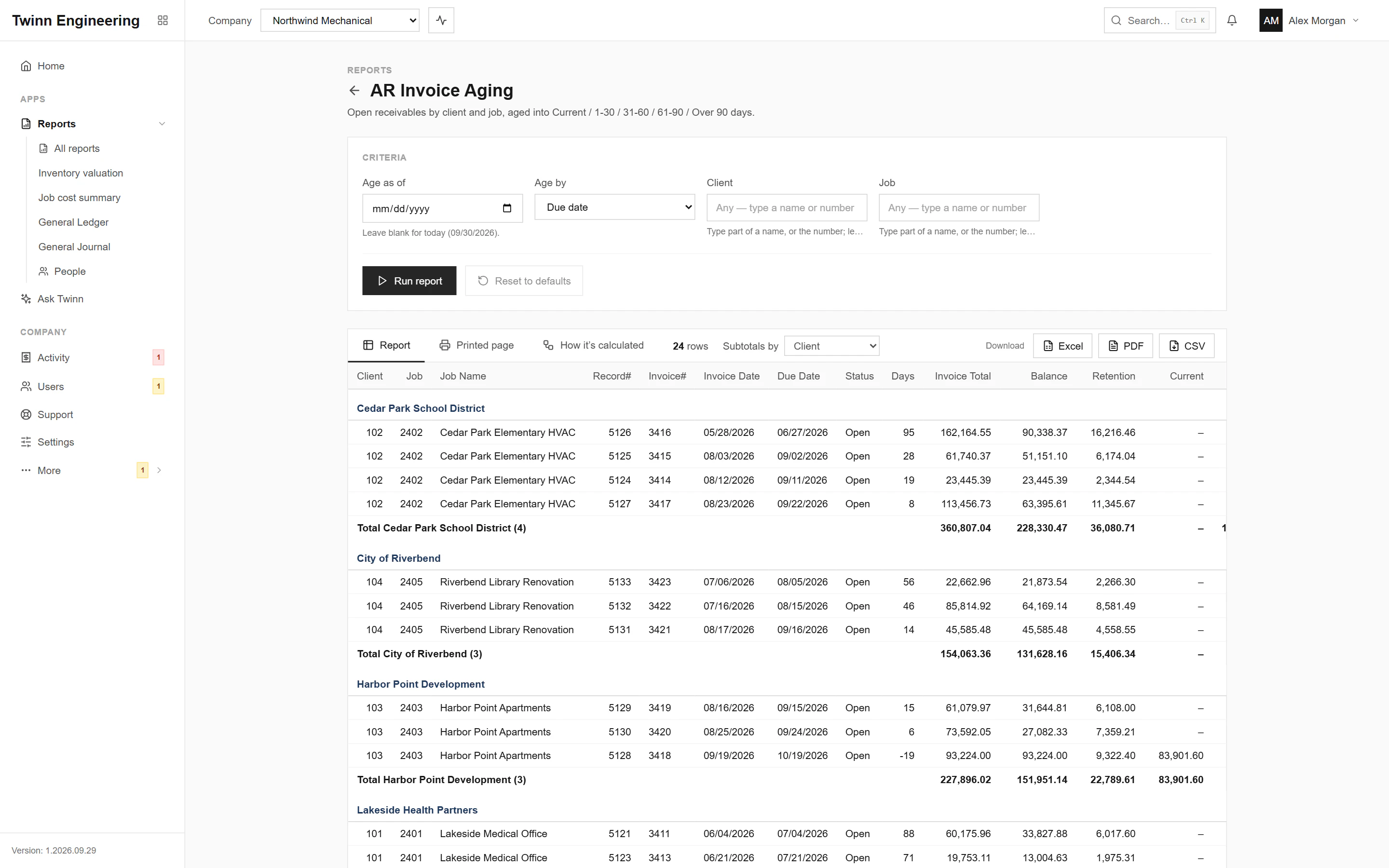
Who owes you, how much, and for how long. Open invoices by client and job, with retention, in current, 1–30, 31–60, 61–90 and over-90-day buckets, so the collections call list writes itself.
It runs in your browser against your live Sage 100 Contractor data, through the Twinn service on your own network, and exports to Excel, PDF or CSV.
Who uses it
- AR clerks working the collections list
- Controllers reviewing cash flow
- Owners asking where the money is
The questions it answers
- Which clients are more than 60 days past due?
- How much of our receivables is over 90 days?
- How much of what clients owe is retention?
Ask Twinn · Early access
“Which clients owe us more than 60 days past due?”
Ask Twinn, the assistant inside Twinn, runs this same report to answer questions in plain English. It tells you which report it ran, with which criteria, as of when, so the answer always matches the report.
How Ask Twinn worksWhat’s in the report
Every column, and what it means.
- Client
- Client number of the invoice's job.
- Client Name
- Client name; the default grouping.
- Job
- Job number the invoice was billed on.
- Job Name
- Job name.
- Record#
- Sage's internal invoice record number (what you type in Receivable Invoices to open it).
- Invoice#
- Invoice number printed on the invoice.
- Invoice Date
- Invoice date.
- Due Date
- Due date.
- Status
- Open, Review or Dispute.
- Days
- Days past due on the as-of date; zero or negative means not yet due.
- Invoice Total
- Original invoice amount, retention and sales tax included.
- Balance
- What the client still owes, retention included.
- Retention
- Retention still held on the invoice. Not aged: it's due when it is released.
- Current
- Net due that isn't past due yet.
- 1-30
- Net due 1 to 30 days past due.
- 31-60
- Net due 31 to 60 days past due.
- 61-90
- Net due 61 to 90 days past due.
- Over 90
- Net due more than 90 days past due.
Criteria you can set
Pick these before you run it. Twinn remembers your last run.
- Age as of
- Age by
- Client
- Job
How it’s calculated
The same notes Twinn shows beside the report, so anyone reading it knows what the numbers include.
- Open = status Open, Review or Dispute with a balance. Balance = Retention + the five aging columns.
- Balances are current balances. The as-of date only sets the age, so this is not a historical aging for a past date.
- Aging by invoice date matches Sage's '~Aged By Invoice Date' variant (03010351).
More Accounts Receivable reports
AR Aging by Job
Open receivables aged into Current / 1-30 / 31-60 / 61-90 / Over 90, by job and optionally by phase, as invoices or job totals.
AR Collection Call Sheet
Past-due receivables by client and job, with the client's contact and phone, the invoice detail and the job notes, for collection calls.
AR Invoice List
Receivable invoices with total, sales tax, paid, retention and balance, and each invoice's receipts (date and check number).
Client Statement
Statement of account per client: every open contract and service invoice, with aging totals per client.
Retention Receivable and Payable by Job
Per job: retention still held by the client on open AR invoices, retention we still hold on open AP (subcontractor) invoices, and the net.
Taxable and Non-taxable Billings by Tax District
AR billings for a period split into taxable, non-taxable and sales tax, by tax district, job city or the job's User Def1 (municipality).
See your own WIP in Twinn
Book a demo and we’ll set Twinn up on a test copy of your Sage 100 Contractor company, then walk you through your own WIP and over/under billings, and this report.
Book a demo