Twinn Reports
46 Sage 100 Contractor reports, live in your browser.
WIP, over/under billings, AR and AP aging, budget vs actual, certified payroll, the financial statements and more, all included. They read your live Sage 100 Contractor data, show how every number is calculated, and export to Excel, PDF or CSV. Nothing to install, and nothing to rebuild in Excel at month end.
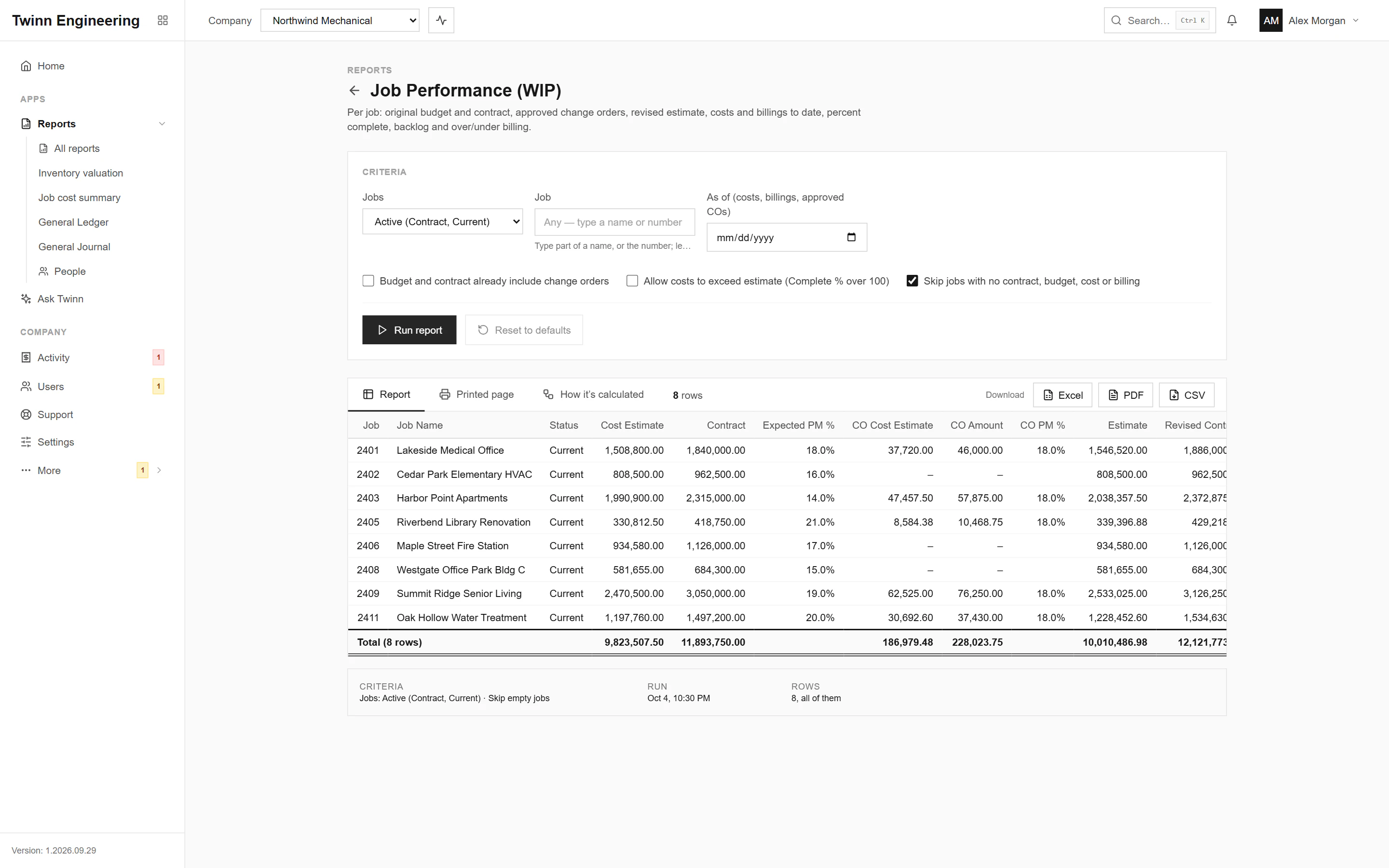
Reports you can hand to the bank
Live, not last night’s copy
Every run reads your Sage 100 Contractor database through the Twinn service on your own network. Post a cost entry and the next run includes it.
Shows its working
Each report says how it is calculated: what is included, what is left out and how each column is worked out, so the reader trusts the number.
One report, every format
The screen, the Excel workbook, the PDF and Ask Twinn all read the same report, so the numbers never disagree between them.
The right people see the right reports
You choose who can run which report. Payroll and personal data are a separate permission, and every run is logged.
Nothing to install
It runs in the browser on any computer, tablet or phone. No Sage seat, no remote desktop, no add-in to keep up to date.
Ask instead of searching
Ask Twinn runs these reports for you when you ask a question in plain English, and shows you which one it used.
Coming soon
Reports that come to you
Scheduled and emailed
Run any report on a schedule (daily, weekly or monthly) and email it as a PDF, Excel workbook or CSV. Last month’s WIP is in the controller’s inbox on the 1st, and the AP aging goes to the bank every Monday.
- Dates like “last month” move with each run
- Send to your team, or to your accountant and bank with an admin’s say-so
- Stops by itself if the person who set it up loses access
- Payroll reports never leave your company
Twinn Reports for iPhone and Android
Run any report and ask Twinn a question from your phone, on the job site or between meetings. Sign in with your Twinn account; there is nothing to set up.
- Every report in the library, with the same numbers as the web
- Ask Twinn, with your conversations kept for 30 days
- Share a PDF or Excel file straight from the phone
- Optional Face ID or fingerprint lock; no report is stored on the phone
Both are included with Twinn Reports. Ask for early access.
The reports people ask for most
Each one has its own page: what it shows, who uses it, every column and how it’s calculated.
Job Cost
Job Performance (WIP)
Which jobs are overbilled, and by how much?
Job Cost
Over/Under Billings
Which jobs are underbilled right now?
Accounts Receivable
AR Invoice Aging
Which clients are more than 60 days past due?
Accounts Payable
AP Invoice Aging
What do we owe that is more than 30 days old?
Job Cost
Budget vs Actual by Cost Code
Which cost codes are over budget on this job?
Job Cost
Job Profitability
Which completed jobs lost money this year?
Job Cost
Committed Costs
How much is still committed but not billed on this job?
Payroll
Certified Payroll
What is the certified payroll for this job and week?
Accounts Payable
Lien Waiver Tracking
Which waivers do we need for last month’s checks, and for how much?
Accounts Payable
Subcontractor Compliance
Which subcontractors have expired insurance?
All 46 reports
Every report below is included with Twinn Reports. Need one that isn’t here? Tell us which; new reports are added to the library for everyone.
Job Cost (9)
Accounts Receivable (7)
Accounts Payable (10)
Cash & General Ledger (11)
Payroll (7)
Purchasing (2)
Ask Twinn · Early access
Don’t know which report? Ask.
Ask Twinn answers questions like “which jobs are over budget right now?” by running these same reports, and tells you which one it ran, with which criteria, as of when.
Meet Ask TwinnRather build your own?
The OPDC API gives you the same live Sage 100 Contractor data the reports read, for your own dashboards, spreadsheets or Power BI.
View API DocumentationSee your own WIP in Twinn
Book a demo and we’ll set Twinn up on a test copy of your Sage 100 Contractor company, then walk you through your own WIP and over/under billings.