Accounts Payable · Included in Twinn Reports
Subcontractor Compliance for Sage 100 Contractor
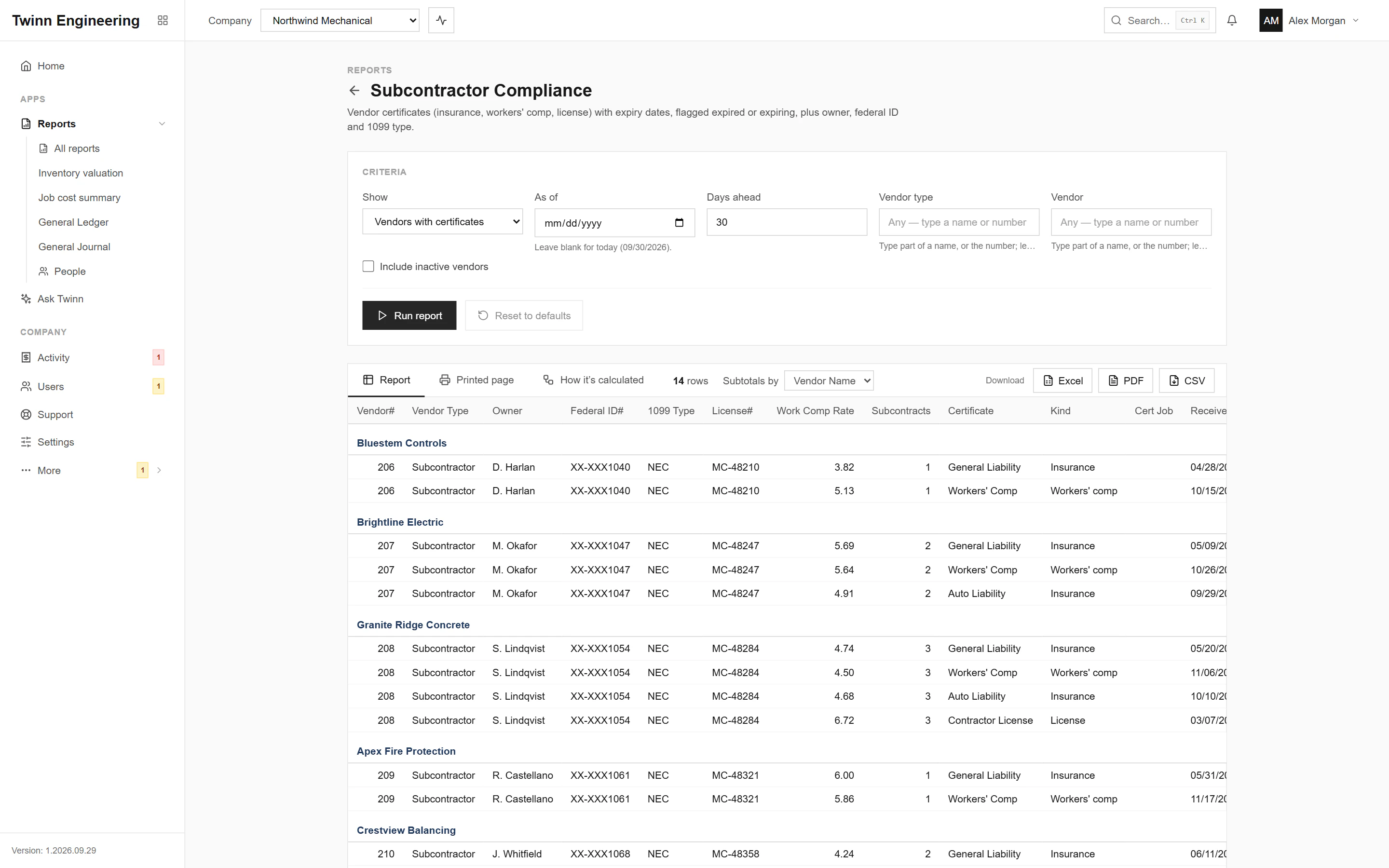
Paying a subcontractor whose insurance has lapsed is a risk you carry. This lists each vendor’s insurance, workers’ comp and license certificates with their expiry dates, flags what has expired or is about to, and shows the subs with an active subcontract and no certificate on file.
It runs in your browser against your live Sage 100 Contractor data, through the Twinn service on your own network, and exports to Excel, PDF or CSV.
Who uses it
- AP clerks before a check run
- Risk and safety managers
- Project managers onboarding subs
The questions it answers
- Which subcontractors have expired insurance?
- What expires in the next 30 days?
- Is this sub cleared to be paid?
Ask Twinn · Early access
“Which subcontractors have insurance expiring in the next 30 days?”
Ask Twinn, the assistant inside Twinn, runs this same report to answer questions in plain English. It tells you which report it ran, with which criteria, as of when, so the answer always matches the report.
How Ask Twinn worksWhat’s in the report
Every column, and what it means.
- Vendor#
- Vendor number.
- Vendor Name
- Vendor name; the report is grouped by it.
- Vendor Type
- Vendor type name.
- Owner
- Owner of the business.
- Federal ID#
- Federal tax ID.
- 1099 Type
- 1099 type.
- License#
- Contractor's license number (Sage stores no license expiry on the vendor).
- Work Comp Rate
- Workers' comp rate on the vendor record.
- Subcontracts
- Number of the vendor's subcontracts that aren't Bid or Refused.
- Certificate
- Certificate description as typed in Sage (e.g. General Liability, Workers' Comp, COI).
- Kind
- Workers' comp, License, W-9, Insurance or Other, read from the description.
- Cert Job
- Job the certificate is for (blank = all jobs).
- Received
- Date the certificate was received.
- Expires
- Expiry date.
- Days Left
- Days from the as-of date to expiry (negative = expired that many days ago).
- Compliance
- Expired, Expiring, Current, No expiry date, or None on file.
- Warn
- Sage warns when the certificate has expired (the Warning box).
- Stop Pay
- Sage stops payment when the certificate has expired (the Stop Pay box).
- Current Balance
- What we owe the vendor now (repeated on each certificate row, so not totaled).
Criteria you can set
Pick these before you run it. Twinn remembers your last run.
- Show
- As of
- Days ahead
- Vendor type
- Vendor
- Include inactive vendors
Its own permission
This report shows payroll or personal details, so it sits behind a separate permission. Only the people you allow can run it, and Ask Twinn can only run it for them.
How it’s calculated
The same notes Twinn shows beside the report, so anyone reading it knows what the numbers include.
- Sage keeps insurance, workers' comp and license expiry dates as certificate lines on the vendor (Vendors > Certificates), not as vendor fields.
- Expiring = expires within the number of days ahead. Kind is read from the certificate description.
- 'Subcontractors without certificates' lists vendors with an active subcontract and no certificate on file.
More Accounts Payable reports
AP Invoice Aging
Open payables by vendor, aged into Current / 1-30 / 31-60 / 61-90 / Over 90 days.
Lien Waiver Tracking
AP payments by job and vendor for a check date range: which lien waivers to collect, for how much, and what's still unpaid.
1099 Vendor Payments
Payments to 1099 vendors in a calendar year, by check date, with federal ID, 1099 type and form box, checked against Sage's 1099 amounts.
AP Invoice List
Payable invoices with totals, payments, retention and balance.
Payment Invoice Details
AP payments and the invoices they paid, by vendor.
Set to Pay
Payment approval list: open invoices with the amount set to pay, by job or vendor, with balance, retention, discount and warnings.
See your own WIP in Twinn
Book a demo and we’ll set Twinn up on a test copy of your Sage 100 Contractor company, then walk you through your own WIP and over/under billings, and this report.
Book a demo