Payroll · Included in Twinn Reports
Certified Payroll for Sage 100 Contractor
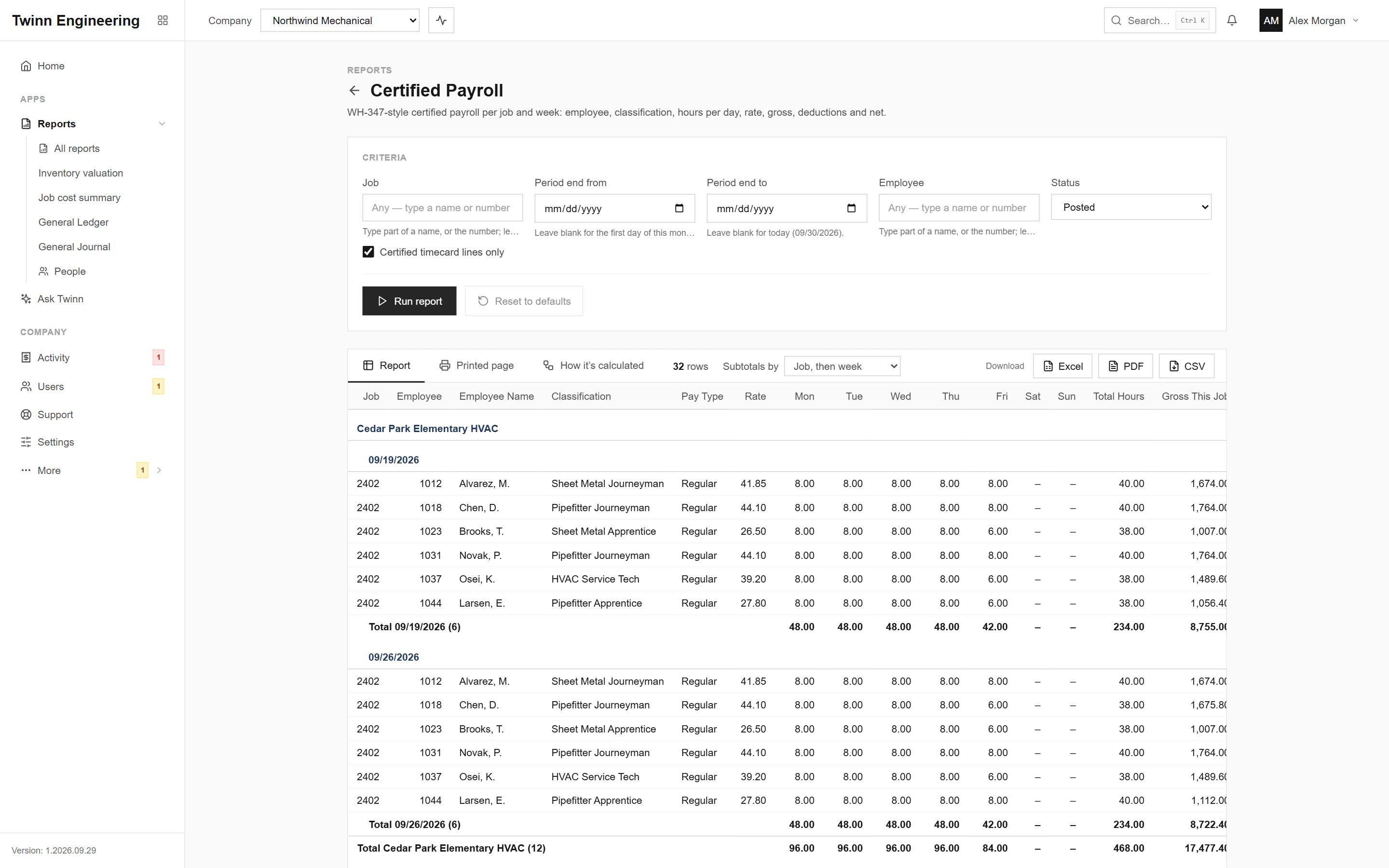
The weekly record for prevailing-wage work, laid out like the WH-347: each employee on the job, their classification, hours per day, rate, gross, deductions and net. It is a report, not the signed form, and it shows no Social Security numbers or addresses. Payroll is its own permission in Twinn, so only the people you allow can run it.
It runs in your browser against your live Sage 100 Contractor data, through the Twinn service on your own network, and exports to Excel, PDF or CSV.
Who uses it
- Payroll administrators on public work
- Compliance staff answering agency requests
- Project managers on prevailing-wage jobs
The questions it answers
- What is the certified payroll for this job and week?
- Who worked on the job, in which classification?
- Do the hours match the timecards that were posted?
Ask Twinn · Early access
“Run certified payroll for the courthouse job for last week.”
Ask Twinn, the assistant inside Twinn, runs this same report to answer questions in plain English. It tells you which report it ran, with which criteria, as of when, so the answer always matches the report.
How Ask Twinn worksWhat’s in the report
Every column, and what it means.
- Job
- Job number of the timecard lines.
- Job Name
- Job name.
- Week Ending
- The payroll period end of the check.
- Employee
- Employee number.
- Employee Name
- Last name, first name.
- Classification
- Work classification (trade) of the paygroup on the line.
- Pay Type
- Regular, Overtime, Premium, ...
- Rate
- Hourly pay rate on the line.
- Mon
- Hours worked on Monday of the week.
- Tue
- Hours worked on Tuesday.
- Wed
- Hours worked on Wednesday.
- Thu
- Hours worked on Thursday.
- Fri
- Hours worked on Friday.
- Sat
- Hours worked on Saturday.
- Sun
- Hours worked on Sunday.
- Total Hours
- Hours on the row.
- Gross This Job
- Pay earned on this job for the row.
- Check#
- Check number (first row of the check).
- Check Gross (All Jobs)
- Gross pay of the whole check, all jobs.
- FICA
- Social Security + Medicare withheld on the check.
- Federal W/H
- Federal income tax withheld on the check.
- State W/H
- State income tax withheld on the check.
- Other Deductions
- All other deductions on the check.
- Net Pay
- Net pay of the check.
Criteria you can set
Pick these before you run it. Twinn remembers your last run.
- Job
- Period end from
- Period end to
- Employee
- Certified timecard lines only
- Status
Its own permission
This report shows payroll or personal details, so it sits behind a separate permission. Only the people you allow can run it, and Ask Twinn can only run it for them.
How it’s calculated
The same notes Twinn shows beside the report, so anyone reading it knows what the numbers include.
- This is a report laid out like the WH-347, not the official form: no statement of compliance, signature or fringe-benefit section.
- A week is a payroll period (the check's period end). Hours per day come from the timecard lines' dates.
- Check#, Check Gross, FICA, withholding, other deductions and net pay are for the whole check (all jobs); they print once per check and aren't totaled.
- No Social Security numbers or addresses are shown.
More Payroll reports
Employee List
Employees with status, position, department, pay type and rates, hire and inactive dates, tax state and contact.
Federal Tax Report
Per employee for a quarter, year or check-date range: gross, federal wages and withholding, Social Security and Medicare wages and tax (employee and employer), and FUTA.
Payroll by Check Date
Pay per employee for a check-date range, with a column for each withholding and deduction.
Payroll Check Register
Payroll checks with hours, gross, taxes & deductions, additions and net.
State Tax Report
Per state and employee for a quarter, year or check-date range: state wages and income tax withheld, SUI wages and employer SUI, and other state payroll taxes.
Workers' Comp Report
Hours, comp gross, comp wages and premium per workers' comp code for a check-date range, optionally by employee or by job.
See your own WIP in Twinn
Book a demo and we’ll set Twinn up on a test copy of your Sage 100 Contractor company, then walk you through your own WIP and over/under billings, and this report.
Book a demo