Job Cost · Included in Twinn Reports
Committed Costs for Sage 100 Contractor
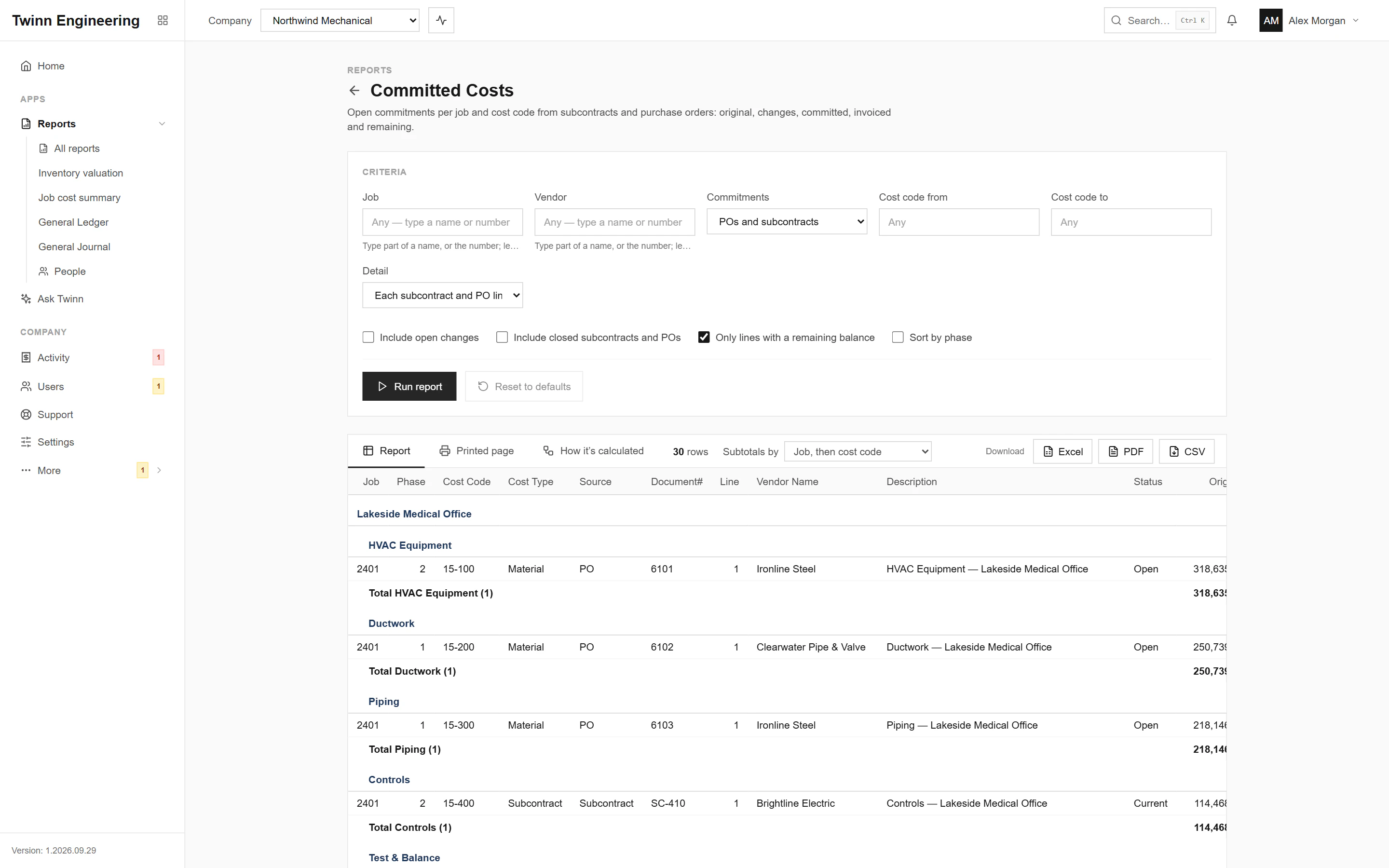
The cost that is coming even though it has not been invoiced yet: subcontracts and purchase orders against each job, what has been billed against them, and what remains. Add it to cost to date and you see where a job will really finish.
It runs in your browser against your live Sage 100 Contractor data, through the Twinn service on your own network, and exports to Excel, PDF or CSV.
Who uses it
- Project managers forecasting cost at completion
- Controllers accruing costs
- Purchasing checking open commitments
The questions it answers
- How much is still committed but not billed on this job?
- Which subcontracts have the most left to bill?
- What is our total open commitment across all jobs?
Ask Twinn · Early access
“How much is committed but not yet billed on each active job?”
Ask Twinn, the assistant inside Twinn, runs this same report to answer questions in plain English. It tells you which report it ran, with which criteria, as of when, so the answer always matches the report.
How Ask Twinn worksWhat’s in the report
Every column, and what it means.
- Job
- Job number.
- Job Name
- Job name (a grouping level).
- Phase
- Phase of the subcontract or PO (0 = none).
- Cost Code
- Cost code of the line.
- Cost Code Name
- Cost code description.
- Cost Type
- Cost type of the line.
- Source
- Subcontract or PO (blank in the summary).
- Document#
- Subcontract# or PO Order#.
- Line
- Line number on the subcontract or PO (for an open change: the subcontract line it changes).
- Vendor Name
- Subcontractor or supplier.
- Description
- Line description (the document's when the line has none); 'Open change <#>: ...' for open changes; the document count in the summary.
- Status
- Subcontract status (Contract, Current, Complete, Closed) or PO status (Open, Review, Dispute, Closed).
- Original
- Original subcontract line amount, or PO line total as ordered.
- Changes
- Approved subcontract changes; for PO lines, minus the canceled items.
- Open Changes
- Subcontract changes not approved yet. Only filled in with 'Include open changes'; otherwise blank and hidden.
- Committed
- The revised commitment.
- Invoiced
- Invoiced on the subcontract line, or received to date on the PO line.
- Remaining
- Still to be invoiced: the open commitment.
Criteria you can set
Pick these before you run it. Twinn remembers your last run.
- Job
- Vendor
- Commitments
- Cost code from
- Cost code to
- Include open changes
- Include closed subcontracts and POs
- Only lines with a remaining balance
- Detail
- Sort by phase
How it’s calculated
The same notes Twinn shows beside the report, so anyone reading it knows what the numbers include.
- Subcontracts: Committed = original + approved changes; Invoiced = what the vendor has billed against the line. Tick 'Include open changes' to add subcontract changes that aren't approved yet.
- POs: Committed = ordered less canceled items (before sales tax); Invoiced = received to date, which Sage records when the vendor's AP invoice is entered against the PO.
- Remaining = Committed − Invoiced, never below zero: an over-invoiced line has nothing left to spend.
- Bid and Refused subcontracts, and void and master POs, are never commitments. Closed subcontracts and POs are left out unless you tick 'Include closed'.
- 'Only lines with a remaining balance' hides fully invoiced lines.
More Job Cost reports
Job Performance (WIP)
Per job: original budget and contract, approved change orders, revised estimate, costs and billings to date, percent complete, backlog and over/under billing.
Over/Under Billings
The WIP schedule: per job, revised contract, estimated cost, cost to date, percent complete, earned revenue, billed to date, over- and under-billings and gross profit to date, as of a date.
Budget vs Actual by Cost Code
Per job, phase and cost code: budget against actual cost and hours, the variance and the percent used, optionally with a budget and actual column per cost type.
Job Profitability
Per job: contract and service revenue billed, cost by cost type (material, labor, equipment, subcontract, other), gross profit and margin, for a date or period range or to date.
Job Cost Journal
Job cost records by job, phase and cost code.
Job Status Report
Job list with status, type, client, supervisor, key dates, contract, billed and cost to date.
See your own WIP in Twinn
Book a demo and we’ll set Twinn up on a test copy of your Sage 100 Contractor company, then walk you through your own WIP and over/under billings, and this report.
Book a demo