Job Cost · Included in Twinn Reports
Job Performance (WIP) for Sage 100 Contractor
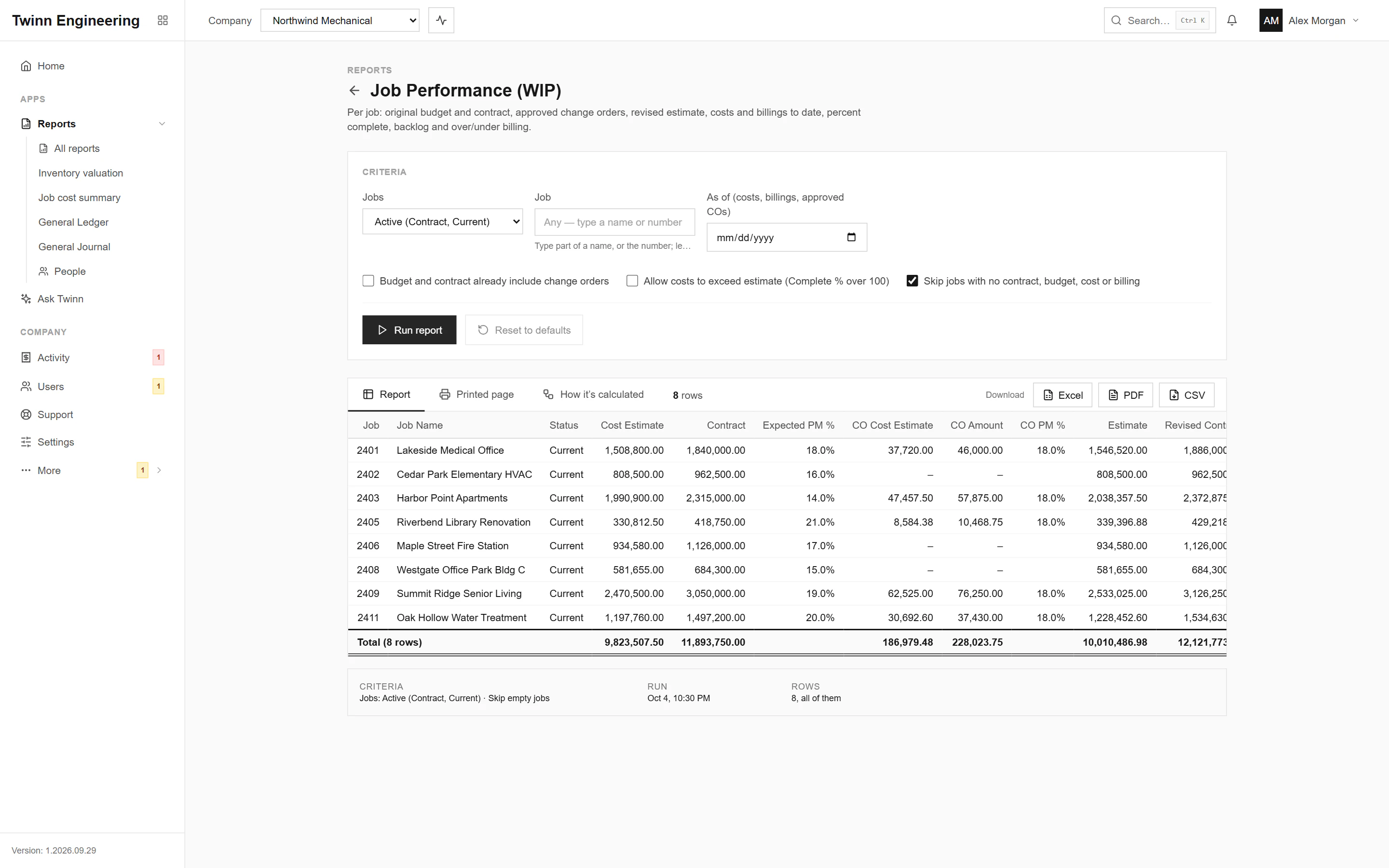
The work-in-progress schedule your bank, bonding agent and CPA ask for, without rebuilding it in Excel every month. Every job, its revised contract and estimate, cost to date, percent complete, earned revenue, over or under billing and backlog, as of any date you pick.
It runs in your browser against your live Sage 100 Contractor data, through the Twinn service on your own network, and exports to Excel, PDF or CSV.
Who uses it
- Controllers closing the month
- CFOs and owners preparing for the bank or surety
- Project managers checking their jobs
The questions it answers
- Which jobs are overbilled, and by how much?
- What is our backlog going into next quarter?
- Which jobs are tracking below the margin they were bid at?
- What did the WIP look like at the end of last quarter?
Ask Twinn · Early access
“Show me the WIP schedule as of the end of last month.”
Ask Twinn, the assistant inside Twinn, runs this same report to answer questions in plain English. It tells you which report it ran, with which criteria, as of when, so the answer always matches the report.
How Ask Twinn worksWhat’s in the report
Every column, and what it means.
- Job
- Job number.
- Job Name
- Job name.
- Status
- Job status.
- Cost Estimate
- Job budget.
- Contract
- Contract amount on the job.
- Expected PM %
- Margin the job was set up with.
- CO Cost Estimate
- Budget of approved prime change orders.
- CO Amount
- Approved amount of approved prime change orders.
- CO PM %
- Margin on the approved change orders.
- Estimate
- Revised cost estimate.
- Revised Contract
- Contract with approved change orders.
- Revised PM %
- Expected margin after change orders.
- Costs to Date
- Job cost posted (to the as-of date).
- Billings to Date
- Amount billed (to the as-of date), retention included, sales tax excluded.
- Current PM %
- Margin so far on a billed basis.
- Cost to Complete
- Estimate still to spend; negative when costs have passed it.
- Complete %
- Percent complete by cost.
- Earned Revenue
- Revenue earned by the work done.
- Backlog
- Contract not yet billed.
- Over/Under Billed
- Positive = billed ahead of the work (overbilled); negative = work not yet billed (underbilled).
- Billings This Year
- Billings dated in the calendar year of the as-of date (this year when blank), up to the as-of date.
Criteria you can set
Pick these before you run it. Twinn remembers your last run.
- Jobs
- Job
- As of (costs, billings, approved COs)
- Budget and contract already include change orders
- Allow costs to exceed estimate (Complete % over 100)
- Skip jobs with no contract, budget, cost or billing
How it’s calculated
The same notes Twinn shows beside the report, so anyone reading it knows what the numbers include.
- Cost Estimate is the job budget. Approved prime change orders add their budget (CO Cost) and approved amount (CO Amount). Tick 'Budget and contract already include change orders' if your company posts approved COs into them, otherwise they're counted twice.
- Complete % = Costs to Date / Estimate (capped at 100% unless you allow costs to exceed the estimate). Earned Revenue = Revised Contract x Complete %.
- Over/Under Billed = Billings - Earned Revenue: positive means overbilled (billings in excess of earnings), negative means underbilled.
- Billings exclude void invoices and sales tax. Costs are open job cost records. With an as-of date, costs, billings and approved change orders (by Approved date) are cut off at that date; leave it blank for everything posted.
- Backlog + Billings This Year gives the workbook's 'Backlog + YTD' figure.
More Job Cost reports
Over/Under Billings
The WIP schedule: per job, revised contract, estimated cost, cost to date, percent complete, earned revenue, billed to date, over- and under-billings and gross profit to date, as of a date.
Budget vs Actual by Cost Code
Per job, phase and cost code: budget against actual cost and hours, the variance and the percent used, optionally with a budget and actual column per cost type.
Job Profitability
Per job: contract and service revenue billed, cost by cost type (material, labor, equipment, subcontract, other), gross profit and margin, for a date or period range or to date.
Committed Costs
Open commitments per job and cost code from subcontracts and purchase orders: original, changes, committed, invoiced and remaining.
Job Cost Journal
Job cost records by job, phase and cost code.
Job Status Report
Job list with status, type, client, supervisor, key dates, contract, billed and cost to date.
See your own WIP in Twinn
Book a demo and we’ll set Twinn up on a test copy of your Sage 100 Contractor company, then walk you through your own WIP and over/under billings, and this report.
Book a demo